Create and Manage a Proxmox Cluster
This guide covers how to create a Proxmox VE cluster from two or more nodes.
This guide implements the concept introduced in Chapter 2.14 -- Clustering.
What You'll Learn
- How to create a Proxmox VE cluster and join additional nodes
Prerequisites
- Two or more machines running Proxmox VE (same major version on all nodes)
- Network connectivity between all nodes (ideally a dedicated cluster network)
- Root SSH access between nodes
Used Versions
| Software | Version |
|---|---|
| Proxmox VE | 9.1.2 |
Step-by-Step Implementation
1. Prepare the nodes
- Ensure all nodes run the same Proxmox VE major version.
- Set a unique hostname on each node. The hostname must be resolvable from every other node.
-
Verify that each node can reach the others via SSH. Inside the terminal of the first node, run:
-
Repeat for each node to confirm connectivity.
Empty node requirement
When a node joins an existing cluster, its local configuration (/etc/pve) is replaced by the cluster configuration. Any VMs or containers defined only on that node's local config will be lost. Always join from a fresh or empty node, or back up first.
CPU model considerations
If nodes have different CPU models, plan to set the CPU type to x86-64-v2-AES (or another common baseline) for any VMs you want to live-migrate. The Host CPU type only works when all nodes share the same CPU.
2. Create the cluster on the first node
- Open the Proxmox web UI on the node that will be the first cluster member.
-
Navigate to Datacenter --> Cluster --> Create Cluster.
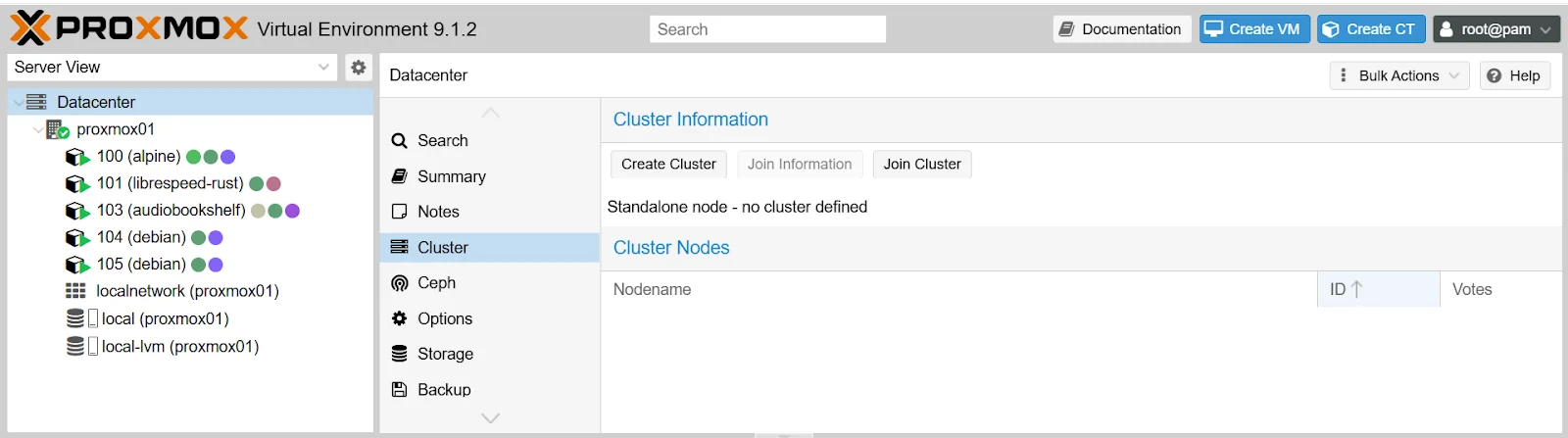
-
Enter a cluster name (e.g.,
School-Cluster). - Select the network link for cluster communication. If you have a dedicated cluster network interface, choose it here.
-
Click Create.
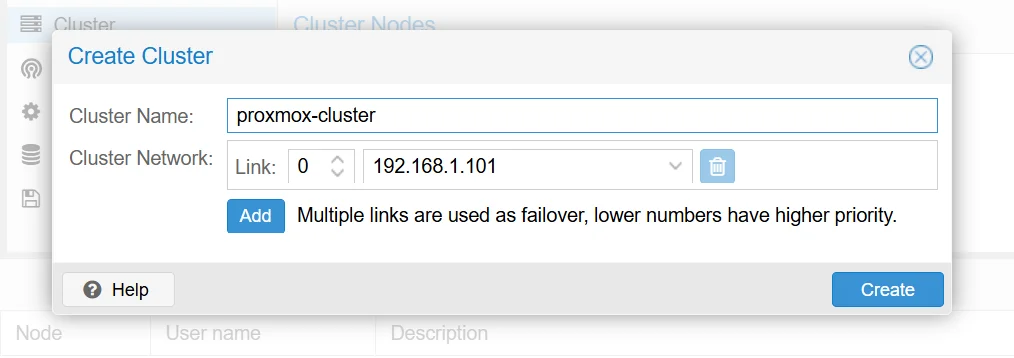
Cluster network
The cluster link carries Corosync traffic (heartbeat, quorum votes, configuration sync). A dedicated network or VLAN avoids contention with VM traffic. If you only have one network, that works too -- Corosync traffic is lightweight.
3. Join the second node to the cluster
- On the first node (the one where you created the cluster), navigate to Datacenter --> Cluster.
-
Click Join Information and copy the displayed join string.
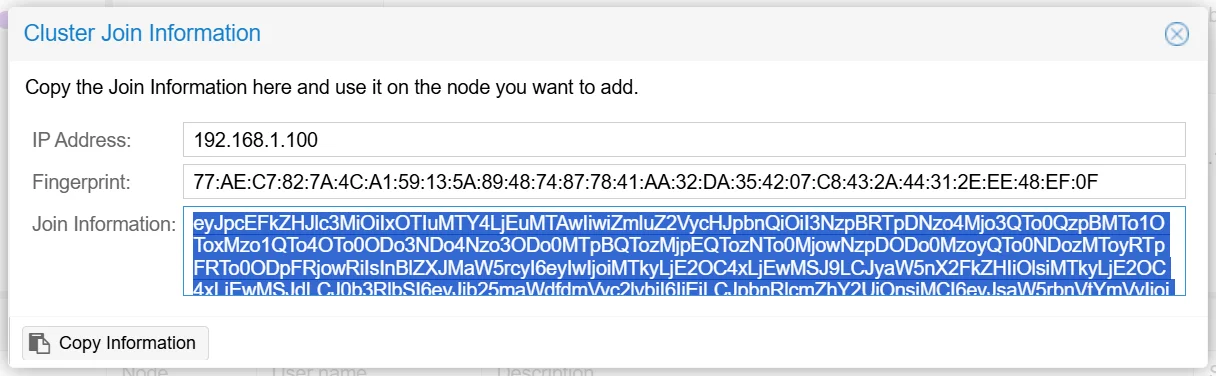
-
On the second node, navigate to Datacenter --> Cluster --> Join Cluster.
- Paste the join information.
- Enter the root password of the first node.
- Select the correct network link if prompted.
- Click Join.
Irreversible merge
Joining a cluster overwrites the joining node's /etc/pve configuration. If the second node already has VMs or containers, back up their configurations before joining.
4. Verify cluster status
-
On any node, run:
-
Confirm the output shows all expected nodes and
Quorate: Yes. -
List individual nodes and their vote counts:
-
In the web UI, navigate to Datacenter --> Cluster and verify all nodes appear with a green status.
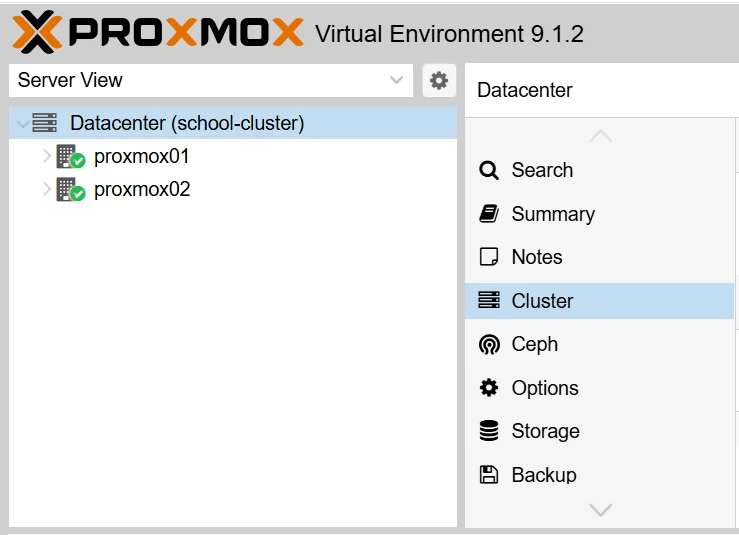
References
- YouTube: "Como crear un cluster con Proxmox 8 y cosas a tener en cuenta - Tu servidor desde cero - Parte #3" -- https://www.youtube.com/watch?v=t5yvfnFvQrU
Revision History
| Date | Version | Changes | Author | Contributors |
|---|---|---|---|---|
| 2026-04-02 | 1.0 | Initial guide creation | Jaime Motjé | Sergio Gimenez |